Before you begin
Create a menu, then open Menu Theme or Customize.
Menus and design
Choose a strong starting point, then tune each menu for the room.
Open in StudioCreate a menu, then open Menu Theme or Customize.
Applying an account theme updates published menus immediately. Per-menu customization is saved as a draft and reaches outputs on Publish.
Menu Theme offers 30 authored styles: classic lists, price and origin groups, columns, ABV charts, tap numbers, and brewery tables. Search the catalog, inspect the fictional sample, and apply a theme across the venue. Print always uses readable ink on white paper.
Web and QR can follow the account theme or use their own saved theme. Existing per-menu layout overrides take precedence until reset.
Customize uses the real menu renderer. Choose organization, grouping, columns, item count, text scale, spacing, header scale, row fill, and one-line-name behavior. Switch between landscape and portrait preview pages before saving.
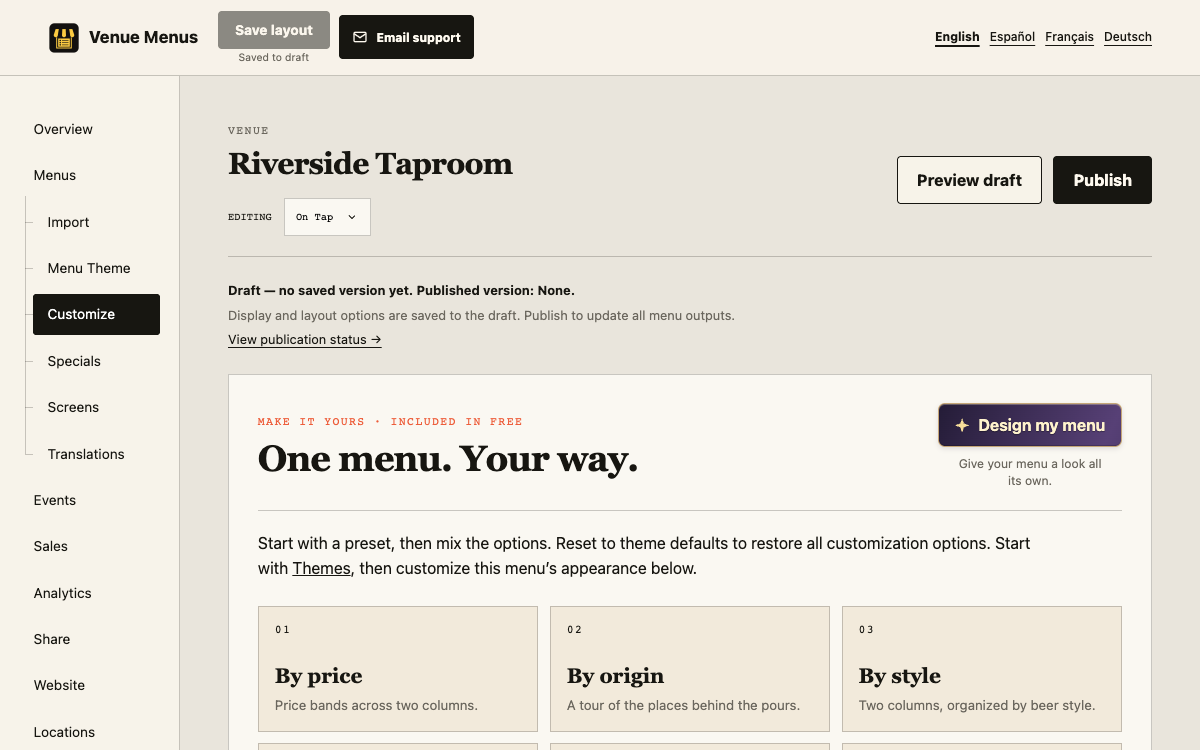
Control descriptions and metadata, cents, state silhouettes, header visibility, and pour-size icons. Pour icons use explicit serving text or the selected Beer glass, Coffee cup, or Wine glass type; Venue Menus never guesses from “Draft” alone. State icons require a recognized US state in Origin.
Save layout preserves the draft. Publish applies it across TV, web, QR, embed, and print. Reset removes overrides and returns to the selected theme’s defaults.
Generated header art and backings are optional. Review the credit quote, generate an editable result, then explicitly select and save it. Retained backings can be reused across account locations for Free.
Seasonal invitations appear from 14 days before New Year, Valentine’s Day, Memorial Day, July 4, Halloween, US Thanksgiving, and Christmas through the local holiday date. Invitations never start generation automatically.
Create and publish a flavor map from Menus → Flavor map, then assign it under Screens → Display.
There are 30 themes. Generated or revised artwork uses credits; selecting retained artwork is Free.
Reset to theme defaults to remove per-menu overrides. Failed saves retain the current controls for retry.
Still stuck? Email Venue Menus support with the location, menu or screen name and the action you were taking.