Before you begin
A saved drinks menu and 500 credits for generation.
Menus and design
Help guests find their next drink by flavor.
Open in StudioA saved drinks menu and 500 credits for generation.
Publish flavor map updates its own guest link, embeds and assigned screens. Menu-list publication stays separate.
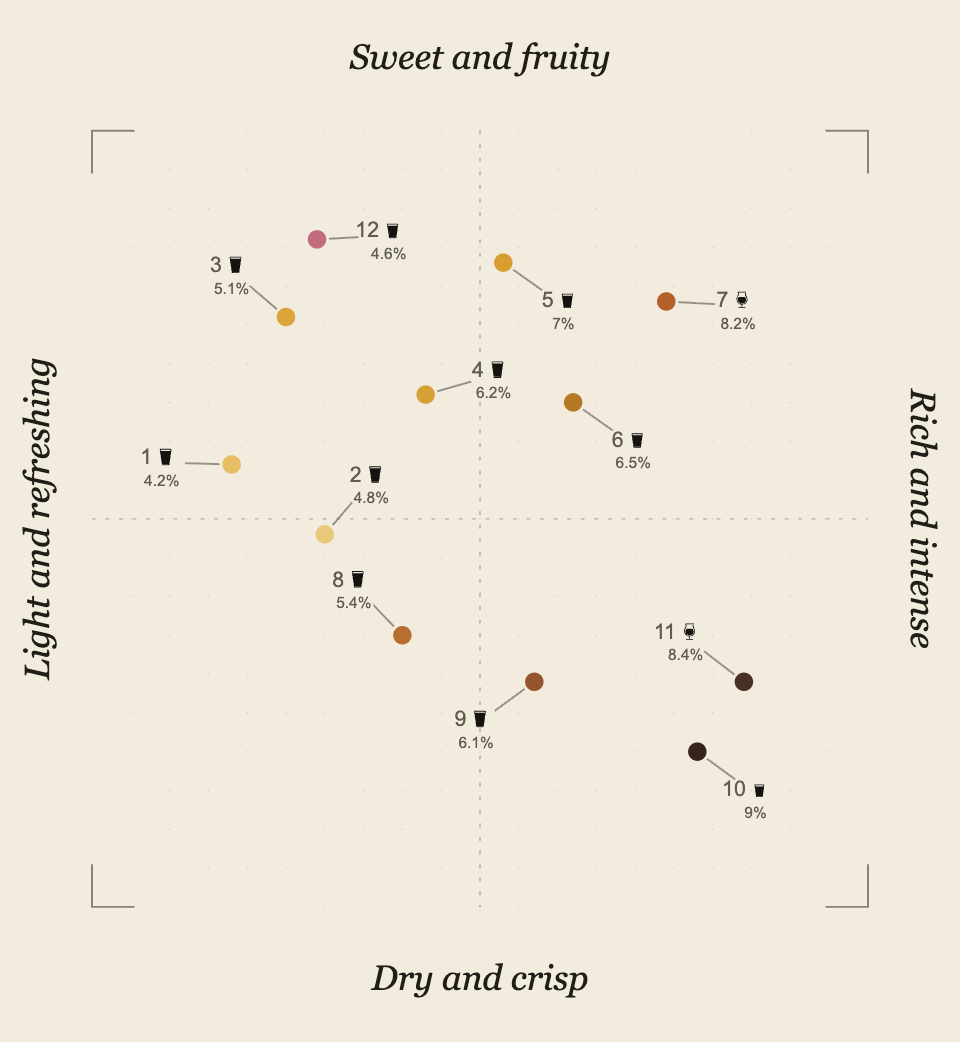
Open Menus → Flavor map and choose Create a flavor map. Confirm the 500-credit quote ($5). AI chooses two flavor axes, positions up to 50 current drinks and estimates their colors from their details.
Review the result and choose Use this draft. Tap numbers connect to each drink’s position. Available pour icons appear in black, with ABV when known; taster pours are omitted.
Choose Publish flavor map. This publishes the saved map and current drink details independently of the menu list. Publishing your menu does not publish your map.
The overview shows your published map. Hosting, sharing and additional screens cost no extra credits. Scheduled menu changes keep the screen’s display choice; each scheduled menu needs its own published map.
The purchase includes placement for 20 future drinks on this menu. After adding drinks to your menu, choose Place new drinks. Each successfully placed new drink uses one addition; failed jobs use none. Existing axes, positions and colors stay unchanged.
Apply the updated draft, then publish the flavor map when ready. Draft changes stay private. To reassess existing drinks or renew an exhausted allowance, create a new map for 500 credits.
Up to 50 current drinks and 20 future additions. Creating another map costs 500 credits and starts a new allowance.
If a screen has no map, publish the map for its assigned menu, including any scheduled menu.
Still stuck? Email Venue Menus support with the location, menu or screen name and the action you were taking.